For iPhone and iPad

Your health.
Calmly in view.

HealthLumio turns your Apple Health data into an elegant, personal dashboard – with fair comparisons and trends across many years. Everything stays on your device.

For iPhone, iPad and iPhone Duo · iOS 26 or later · no account

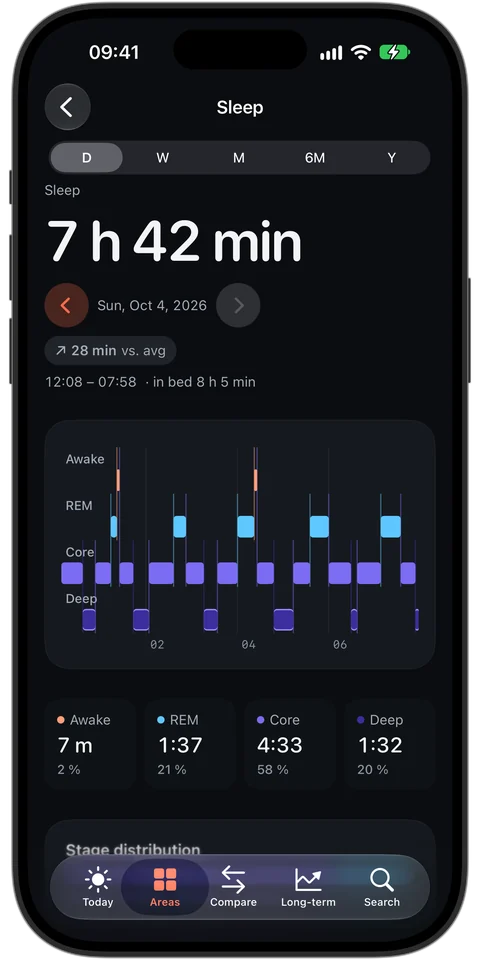
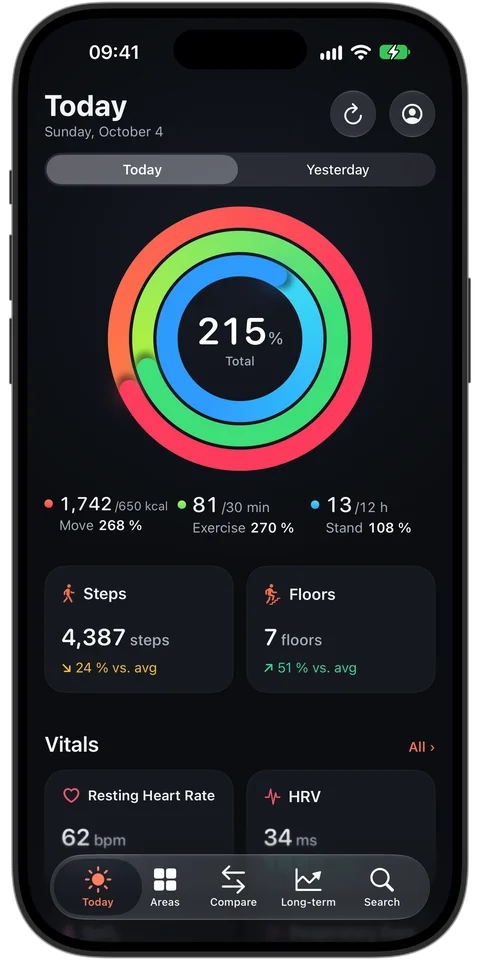
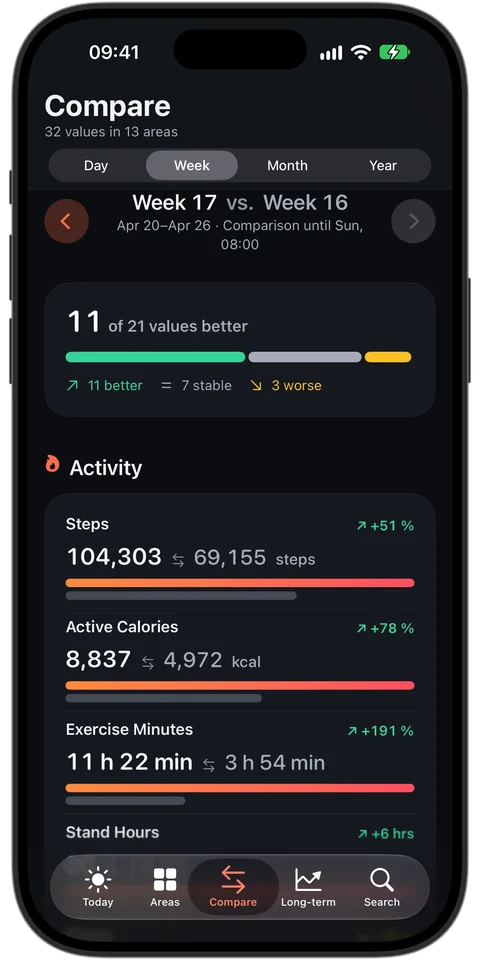
HealthLumio: sleep with last night's sleep stages HealthLumio: Today view with Move, Exercise and Stand rings, steps, floors and vitals HealthLumio: comparison week 17 vs. week 16: 11 of 21 values better, 7 stable, 3 worse
  • No account
  • No server
  • No ads
  • No tracking
  • Light and dark mode

New: Lumi

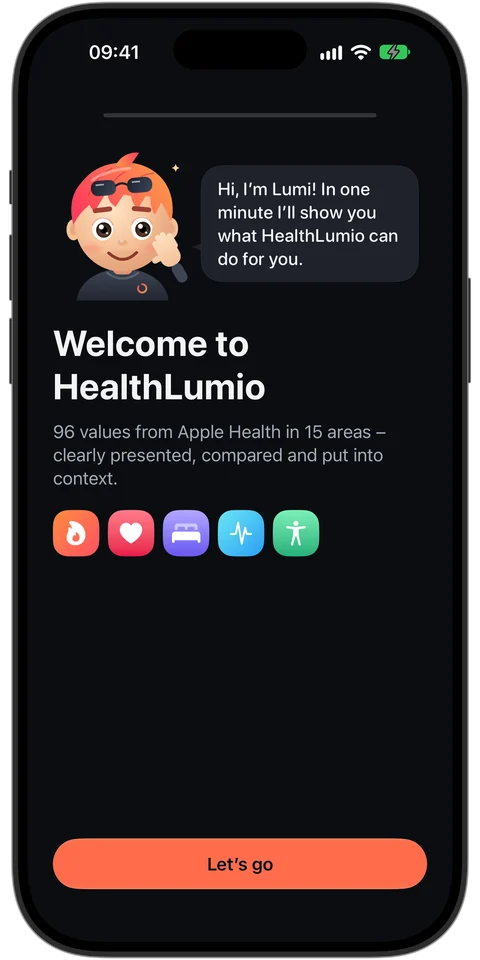
Hi, I'm Lumi.

Lumi is your little companion and guides you through setup in about a minute – friendly, personal and without that form-filling feeling.

  • “What should I call you?” – afterwards, “Today” greets you by name.
  • Profile from Apple Health: date of birth, sex, height and weight are taken over – no typing things twice.
  • Your goals for steps and sleep; ring goals come straight from your activity goals.
  • Everything stays on the device – your name isn't synced either.

Welcome to HealthLumio: Lumi introduces itself Lumi, the HealthLumio companion: orange-red hair, sunglasses on the head, hoodie with ring logo

What should I call you?

Features

An observatory for your body.

Deep, calm surfaces with glowing values in precise colors. Every card answers in a second: what is the value – and is it normal for you?

15areas – from heart to daylight
96values from Apple Health
9widgets for Home Screen and Lock Screen
Nodata leaves your device

Today

Your day at a glance.

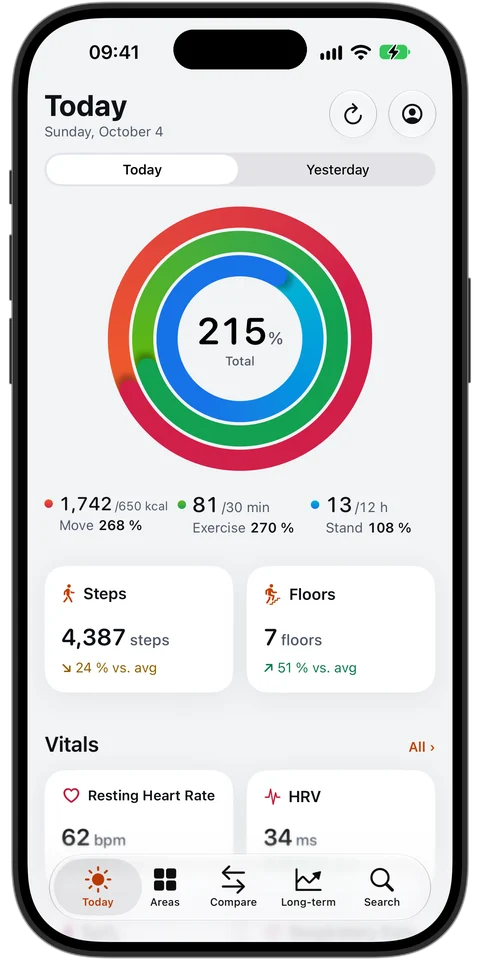
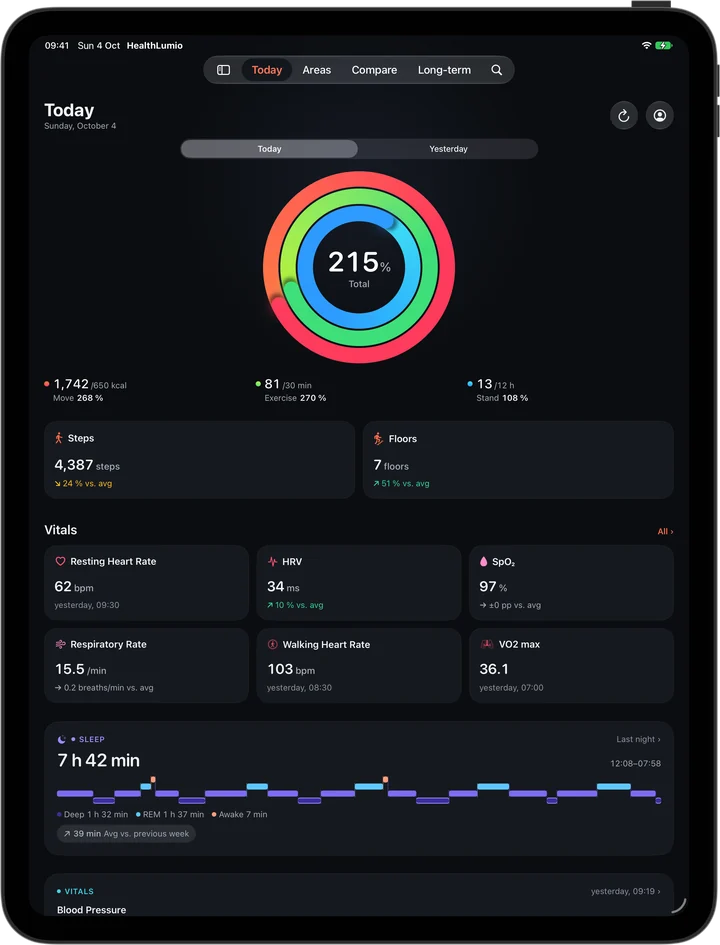
Animated rings, your steps, vitals and last night – sorted by what matters.

  • Move, Exercise and Stand rings – even above 100%.
  • Steps and floors compared with your personal normal.
  • Resting heart rate, HRV, blood oxygen and respiratory rate put into context.
  • Latest blood pressure, weight, workout and heart checks – without searching.
  • Today or yesterday – swipe to the completed previous day.
Today view: rings at 215 percent, 4,387 steps, resting heart rate 62 bpm, HRV 34 ms

Areas

15 areas. 96 values.

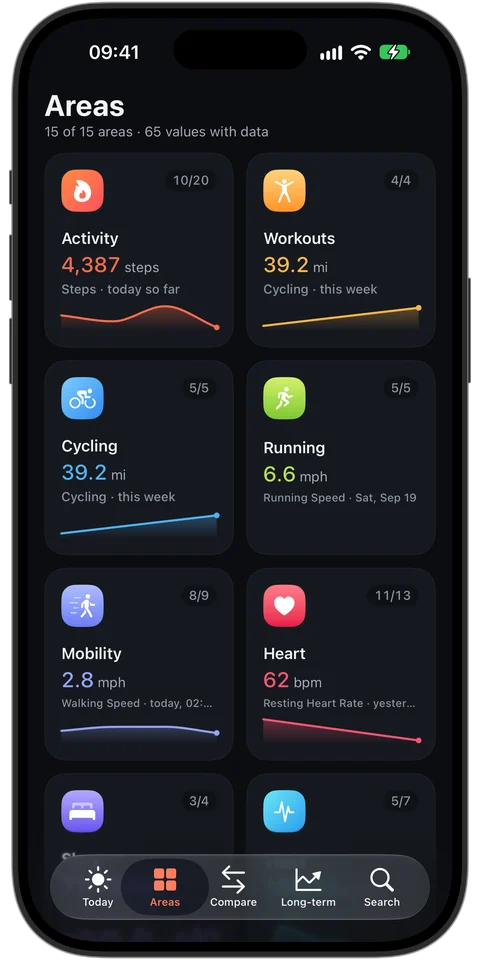
Everything that lands in Apple Health – from Apple Watch, iPhone, scale or blood pressure monitor – clearly organized by area.

Activity Heart Sleep Vitals Body Workouts Cycling Running Mobility Respiratory Nutrition Mindfulness Hearing Environment Other
Areas: tiles for activity, workouts, cycling, running, mobility, heart, sleep and vitals

Every metric in detail

Tap. Scrub. Read it exactly.

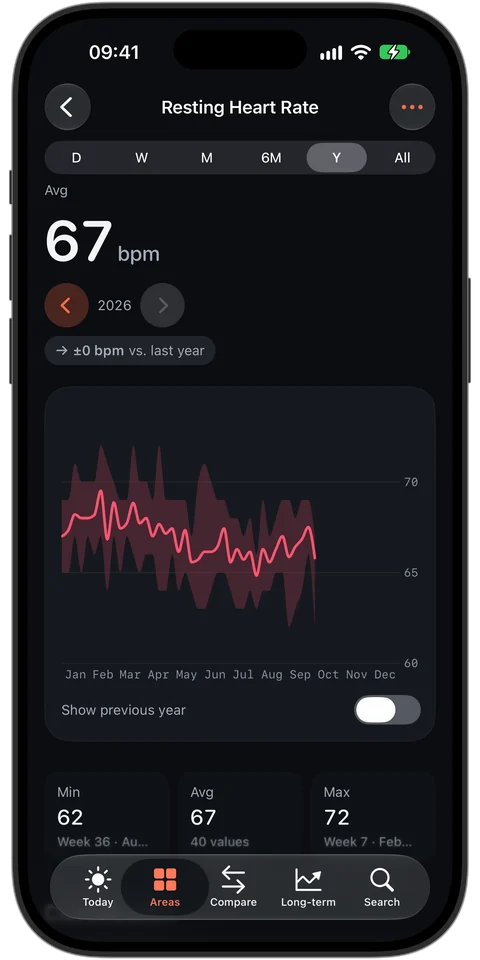
Interactive charts for every period – from a single day to all the years your health data goes back.

  • Day, week, month, 3 to 12 months, year and “All” – swipe through the periods.
  • Minimum, average, maximum, your records – and every value as a table.
  • Show the previous year – as a dashed line right in the chart.
Resting heart rate over the year: 67 bpm on average, minimum 62, maximum 72

Sleep

Your night, stage by stage.

Awake, REM, core and deep as a clear timeline – plus bedtime, wake-up time and how the stages are distributed.

  • Sleep stages of last night and every night before.
  • Comparison with your average – how much more or less you slept.
  • Calendar heatmap of your sleep across the whole year.
Sleep: 7 hours 42 minutes with the stages awake, REM, core and deep

Compare

Compare instead of guessing.

This week against last week, this month against last month, this year against last year – compared fairly.

  • Fair: running periods are only compared up to today's point.
  • The balance at a glance: how many of your values are better, stable or worse.
  • Tap to filter for the better, stable or worse values.
Comparison week 17 vs. week 16: 11 of 21 values better, 7 stable, 3 worse

Long-term

Your progress over the years.

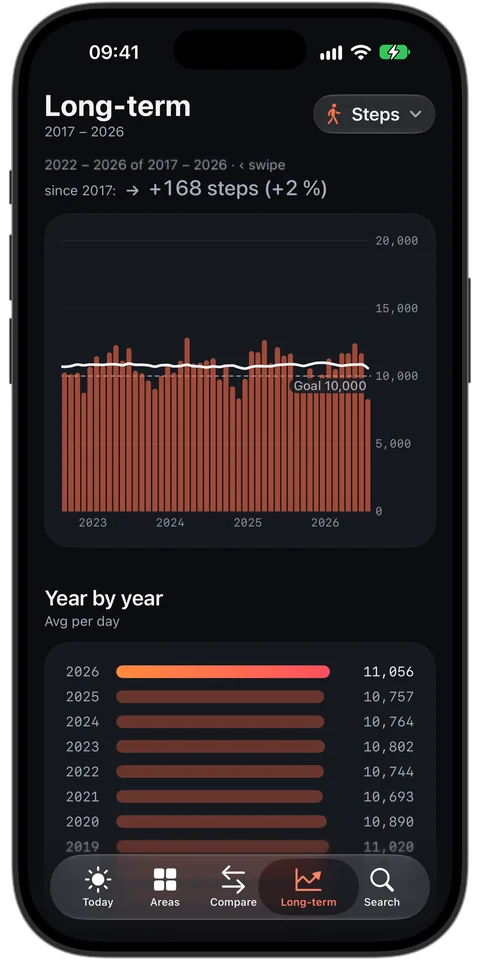
As far back as your health data goes: year by year, overlaid yearly trends and calendar heatmaps.

  • Year-by-year overview with the average per day.
  • Overlaid yearly trends – spot seasons and habits.
  • Heatmaps for steps and sleep.
  • Milestones: your best values and longest goal streaks.
Long-term: steps from 2017 to 2026, yearly bars and year-by-year overview

Info & reference values

Values you understand.

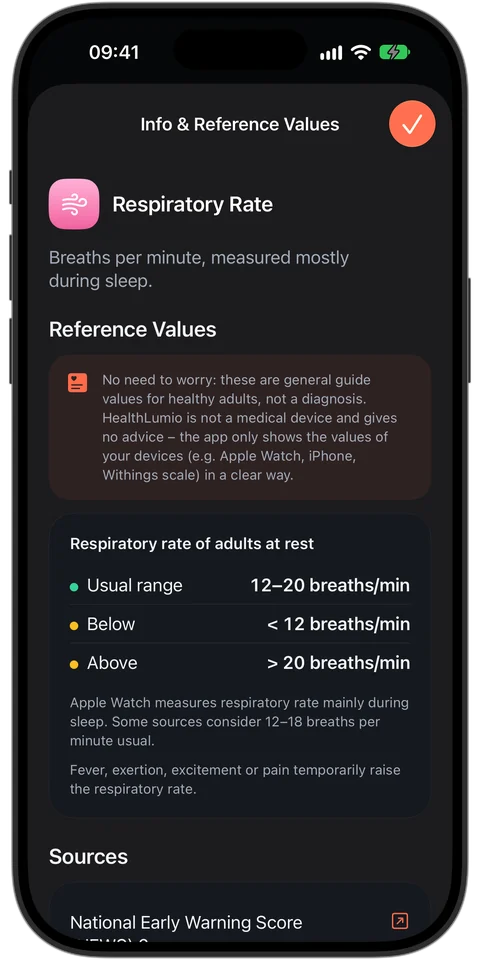
For more than 20 metrics, HealthLumio shows what is usual for healthy adults – with the original source to read up on. Calmly explained, no alarm.

  • Reference values for resting heart rate, respiratory rate, blood oxygen, blood pressure, BMI, waist circumference, blood glucose, sleep, activity, sound levels and nutrition.
  • Checked sources: 2023 ESH guideline, WHO, ADA, AASM, EFSA and more – each linked.
  • In your units – for example blood glucose in mmol/L or temperature in °F.
  • No need to worry: HealthLumio gives no advice, it shows your devices' values clearly.
Info and reference values for respiratory rate: usual range 12 to 20 breaths per minute, with sources

Report for your doctor

Everything important, on paper.

A detailed PDF report with cover page, key figures and charts – created in seconds, only on your device, shared only when you choose.

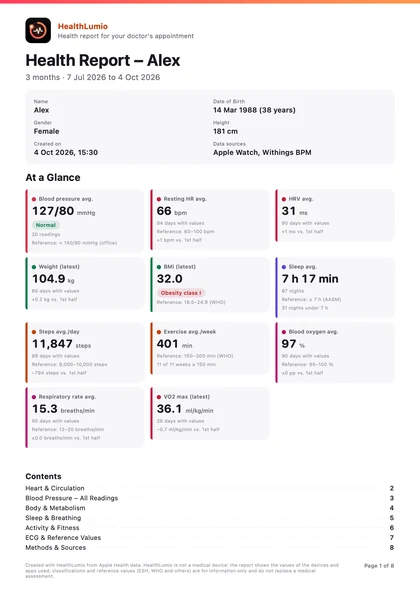
  • At a glance: key figures with reference value and trend, plus profile and data sources.
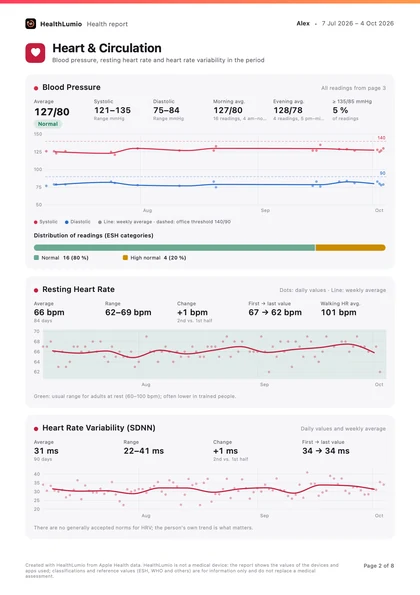
  • Heart & circulation: blood pressure trend with thresholds, morning and evening separately, every reading with its category.
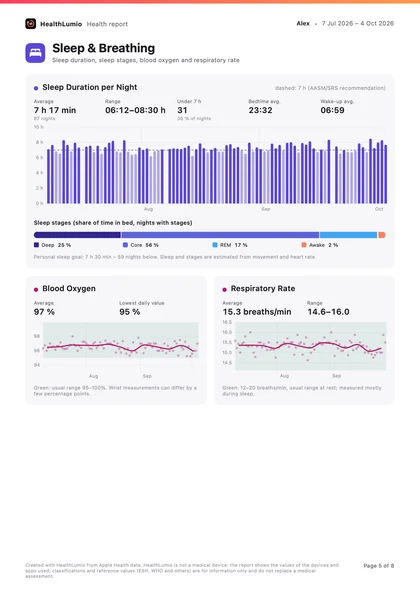
  • Body, sleep & activity: weight, blood glucose, sleep stages, blood oxygen, steps and exercise weeks.
  • Your choice: 30 days to 12 months, content by topic – with methods and sources at the end.
Report page heart and circulation with blood pressure trend and resting heart rate Report page sleep and breathing with sleep duration per night Cover page of the health report with key figures at a glance

And there is more

What else HealthLumio can do.

Every iPhone, every iPad

From iPhone SE to Pro Max, iPad mini to iPad Pro – and iPhone Duo: closed, open and half folded, with content placed exactly at the fold.

Heart checks and ECG

Your latest ECG with its classification and the Apple Watch heart notifications of the last 12 months at a glance.

Workouts in detail

Every workout with heart rate zones, pace and elevation – and a comparison with similar sessions.

Search everything

Find all 96 values by name, unit or area – with the current value right in the results.

Your units

kg, lb or st, km or miles, °C or °F, mg/dL or mmol/L – automatically by region or chosen one by one.

English and German

The app follows your iPhone’s language; numbers and dates appear in your region’s format.

Widgets

Nine widgets for every day.

On the Home Screen, the Lock Screen, the iPad – and on the Mac via iPhone widgets.

Also: insights, an overview of your day and a metric of your choice – 96 to choose from.

Privacy

Your data stays with you.

HealthLumio reads your data only from Apple Health and processes it only on your device. The developer receives none of your data.

On your device only

No account, no server. Charts, comparisons and classifications are created on your iPhone or iPad.

No tracking

No ads, no analytics tools, no third-party services – in the app and on this website.

Read only

HealthLumio writes nothing to Apple Health. You decide in the Health app which data the app may see.

iCloud for settings only

Goals and display settings sync through your iCloud account. Health values are never synced.

On the App Store: “Data Not Collected”. Details in the privacy policy.

Made for everyone

Light, dark, large and spoken.

Dark mode first – and a full light mode with its own contrast-checked colors.

  • VoiceOver with descriptions for every chart.
  • Large text sizes – the layout grows with them.
  • Reduce Motion is respected.
  • Never color alone: status always comes with a symbol and text.
Today view in dark mode Today view in light mode

iPad

More room for your values.

On iPad, HealthLumio uses the full width: rings, steps, all vitals and last night at a glance.

  • More columns – vitals side by side instead of stacked.
  • Any orientation and in a window next to other apps – also in landscape on iPhone and unfolded on iPhone Duo.
  • Widgets on the iPad Home Screen, too.
HealthLumio on iPad Pro: Today view with rings, steps, vitals and sleep

FAQ

Good to know.

Which devices are supported?

iPhone (including iPhone Duo) and iPad with iOS or iPadOS 26 or later. The widgets also appear on the Mac – macOS shows your iPhone's widgets there.

Do I need an Apple Watch?

No. HealthLumio shows everything that lands in Apple Health – from the iPhone itself, Apple Watch, scales, blood pressure monitors or other apps. The more sources, the more values.

Where does my health data go?

Nowhere. The app reads Apple Health and calculates only on your device. There is no account and no server; the developer receives no data. Only settings such as goals and display options sync through your iCloud account.

Does HealthLumio write data to Apple Health?

No. HealthLumio only reads. You can change access at any time in the Health app under Profile → Apps → HealthLumio.

How far back do the long-term trends go?

As far back as your data in Apple Health – often many years if you have used your iPhone for a long time.

Which languages and units does HealthLumio support?

HealthLumio is available in English and German and follows your device's language. Units follow your region and can be changed in Settings – for example pounds or stones, miles, °F, fluid ounces, kilojoules or mmol/L for blood glucose.

Who is Lumi?

Lumi is HealthLumio's companion. On first launch, Lumi guides you through setup, asks what you'd like to be called and takes over your profile from Apple Health. You can watch the introduction again anytime in Settings.

Where do the reference values come from?

From published guidelines and recommendations, such as the 2023 ESH guideline on blood pressure, the WHO, the American Diabetes Association, the AASM and the EFSA. Every source is linked in the app. The values apply to healthy adults and are guidance only – not a diagnosis.

What's in the report for my doctor?

A cover page with key figures, charts for heart and circulation, body, sleep, breathing and activity, all blood pressure readings with their category, your ECGs, plus reference values, methods and sources. You choose the period and content; the PDF is created only on your device.

Is HealthLumio a medical device?

No. HealthLumio is for information only, makes no diagnoses and does not replace medical advice. Classifications such as the blood pressure categories follow recognized guidelines but are for information only.

Another question? Have a look at Support.

Ready to look within?

Get HealthLumio and discover what your Apple Health data says about you.

Download on the App Store

For iPhone, iPad and iPhone Duo · iOS 26 or later